NIIMBOT
- 4.9
- Rating
- 1.00M
- Installs
- Free
- Price
 Analysis by App-foxy
I usually install label-printing apps for one small task, then forget about them once the novelty wears off. My experience with NIIMBOT was different because it is built around a very practical habit: making small, readable labels whenever an item, cable, box, drawer, or document starts becoming difficult to identify. It is a free Tools app from NIIMBOT.Ltd-old, rated for Everyone, and it has reached over a million installs. Those figures suggest that its appeal is not limited to professional inventory work; it also makes sense for ordinary home organization.
The app connects the design side of labeling with a compatible NIIMBOT label printer. That distinction matters. This is not a general document printer, nor is it meant to replace a full desktop publishing program. Its value comes from reducing the distance between noticing a mess and producing a useful label. I found the experience most convincing when I treated it as a small everyday utility rather than an app I would open for elaborate design projects.
From first-week appeal to lasting usefulness
I find the lasting value of NIIMBOT less in printing a first batch of tidy labels than in making later corrections easy enough to actually do. A useful test is whether the labels still help after a drawer, shelf, or shared workspace changes—not whether they look perfect on day one. That ongoing usefulness also makes it worth looking at what the app’s version history can and cannot tell us.
You May Also Like

 Blood Strike: 2.5 Anniversary
Blood Strike’s Loadouts Turn Every Drop Into a Tactical Gamble
A close look at Blood Strike’s custom loadouts: how fast access to signature weapons reshapes its battle royale rhythm, rewards preparation, and narrows the gap between fights.

 Pandora - Music & Podcasts
Pandora’s Music Is Easy to Start, but Harder to Recover
Pandora’s strength is its low-effort path from a seed to a station. Its weak spot is how much confidence it asks you to place in connection, setup, and quiet recovery.

 8 Ball Pool
 Is Built on Rivalries, Rematches, and Routine
A close look at the rivalries, rematches, shared routines, and unanswered safety questions that turn a quick pool match into a persistent mobile community.

 Samsung Music
’s Quiet Strength Is Playing What You Already Own
Its reach comes less from spectacle than from dependable access to a personal library. That simplicity is both the app’s strongest retention engine and its ceiling.

 AccuWeather: Weather Radar
AccuWeather Review: A Quick, Clear Forecast for Everyday Decisions
For everyday plans, the best forecast is the one you can understand quickly. AccuWeather makes rain timing, radar, and local conditions easy to act on, with a few trade-offs.

 Hill Climb Racing
Why Hill Climb Racing Still Turns Crashes Into One More Run
A tiny car, a bumpy hill and one more upgrade: Hill Climb Racing keeps resurfacing because its simple chaos makes every near-miss feel personal.
More From Our News Desk



Why the first sessions feel so easy
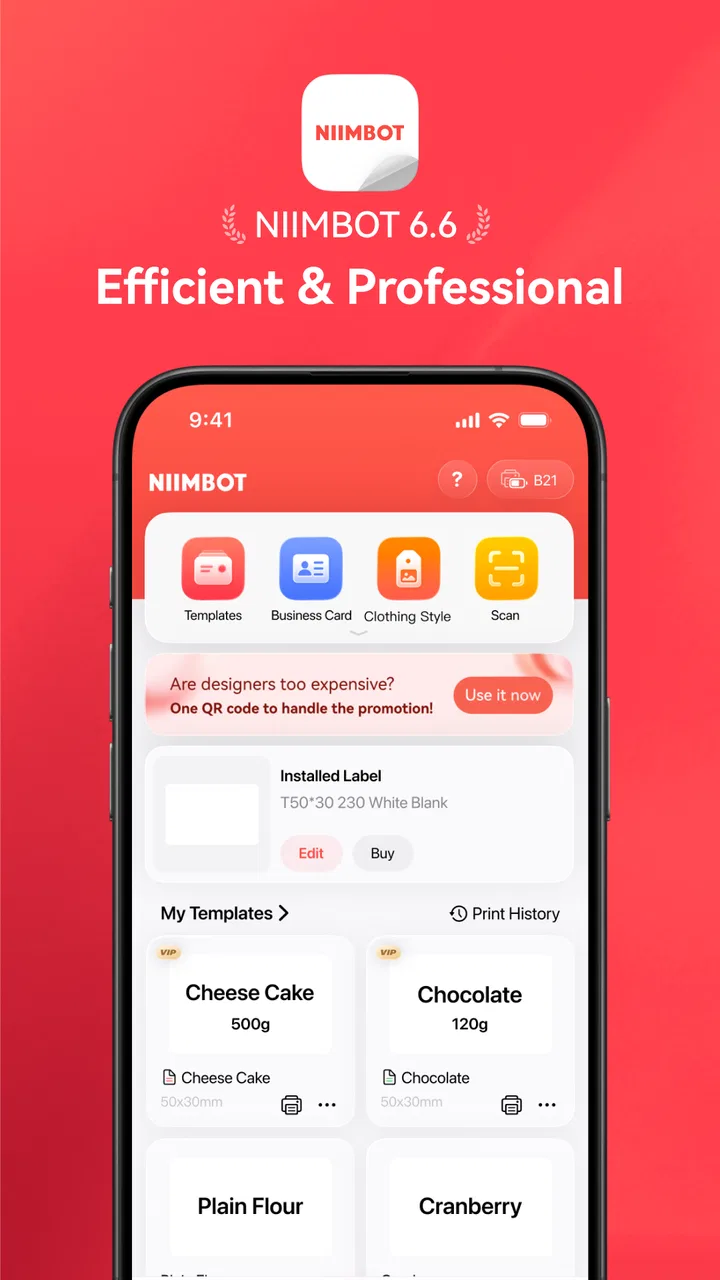
The initial appeal is immediate: choose a label format, add the information, adjust the layout, and print. The store summary calls the experience simple, and that description fits the basic workflow better than a long list of technical claims would. I did not feel that I needed design knowledge to make a label that looked clear. The app is aimed at quick results, and that is exactly where it feels strongest.
A useful first project is a mixed drawer containing charging cables, adapters, spare batteries, and small accessories. Instead of creating a decorative label, I would use short names that remain readable at a glance: “USB-C,” “camera,” “backup,” or “audio.” This is where the app earns its place. It turns a vague organization project into a series of small decisions, and the printed result can save time repeatedly rather than just looking tidy on the day it is made.
I also like that the app encourages labeling by object rather than by broad category. A box marked “old electronics” may still require searching, while a box marked “Wi-Fi gear” or “camera cables” gives a more useful answer. The best results come from thinking about the question I will ask later: “Where would I look for this?” That small change in approach makes the app more useful than simply adding text to a sticker.
For a first-time user, I recommend starting with a small batch. Print a handful of labels for one drawer or shelf, check the text size in the real environment, and only then continue. A label that looks balanced on the phone can feel too dense when viewed from a standing position. Testing a short batch also helps reveal whether the chosen label width suits the objects being organized.
What makes it different from ordinary alternatives
The usual alternative is writing on masking tape, using a permanent marker, or printing a sheet of labels from a computer. Those methods can be perfectly adequate, especially for temporary storage. NIIMBOT becomes more attractive when I want consistent typography, repeated labels, or a cleaner result on small surfaces. The phone-based workflow also avoids opening a document editor and manually arranging a page full of individual stickers.
Compared with a general design app, this tool is more focused. A design app may offer more control over graphics and page composition, but that flexibility can slow down a task that only needs a name and perhaps a short identifier. Compared with handwriting, the app gives better consistency and easier replacement when a box changes purpose. The trade-off is that its convenience depends on having the compatible printing setup available; without that hardware, the app’s central purpose is limited.
That hardware dependency is the first question many people should ask before installing it. If you already use a NIIMBOT printer, the app is a natural companion. If you do not own compatible hardware and only want occasional labels, handwritten tape or a standard home printer may be the more sensible choice. The software is not a universal label-making solution detached from the printer ecosystem.
Small workflows that reveal its real value
One of the less obvious strengths is repeatability. When several containers need related labels, creating them in one sitting is less tiring than improvising each label separately. I would prepare a naming scheme first, such as “winter,” “summer,” and “repair,” then keep the wording short and consistent. The app is most helpful when it supports a system rather than when it is used to decorate isolated objects.
A second useful workflow is temporary organization during a move or renovation. Boxes can be labeled by room and priority, then replaced later when their contents settle into permanent storage. In that situation, I would avoid over-designing the labels. A large room name, a short contents description, and perhaps a simple handling note are more useful than a crowded label that looks impressive but is hard to scan.
A third use is shared spaces. In a kitchen, workshop, classroom, or small office, labels reduce the number of explanations people need to give one another. The important detail is to label the location as well as the item when confusion is likely. For example, a label that identifies a type of cable may be less useful than one that says where it belongs. This is a practical design decision the app cannot make for me, but its quick editing workflow makes it easier to apply.
Month-to-month value depends on changing needs
After the first week, the excitement of printing neat labels naturally fades. That is not a weakness by itself; a utility should become routine. The question is whether it continues to solve small problems without demanding too much attention. In my view, it can, particularly for people who frequently reorganize supplies, manage craft materials, store seasonal items, or maintain a home office.
The recurring value comes from replacement and adjustment. A label may become inaccurate when a drawer changes purpose, a cable is moved, or a box receives new contents. With handwritten tape, replacing the label often means tearing it off and starting again with uneven results. A digital workflow makes the correction feel less permanent and therefore easier to do. That encourages better maintenance of the organization system instead of leaving outdated labels in place.
There is also value in standardizing language over time. If I decide that every storage label should begin with a room name or a project name, future additions look coherent. This matters more after several months, when a collection of individually made labels can otherwise become difficult to interpret. The app does not automatically create an inventory system for me, but it supports the discipline of using one.
For a small business or side project, the app may be useful for product bins, sample folders, shipping supplies, or equipment cases. I would still be cautious about treating it as a complete stock-management tool. Printing a clear label is not the same as tracking quantities, purchase dates, or movement history. Someone who needs searchable inventory records will need another system alongside it. NIIMBOT handles the visible identification layer well; it should not be mistaken for a full database.
Maintenance is simple, but not invisible
The maintenance burden is moderate rather than nonexistent. The app itself needs to remain available and usable, the printer needs compatible label material, and the physical labels eventually need replacing when they peel, fade, or no longer describe what is stored. The digital part is convenient, but the overall system still depends on supplies and a functioning printer.
I recommend keeping label wording deliberately short because concise labels are easier to update. Long descriptions create two problems: they can become hard to read, and they become more annoying to revise when the contents change. A short label also makes it easier to reuse a naming pattern across several storage areas. This is one of the most important habits for keeping the system sustainable.
Another maintenance tip is to review labels when the surrounding space changes, not only when something goes missing. A seasonal reset is enough for many homes: check the pantry, storage closet, cables, and paperwork areas, then replace the labels that no longer match. This turns the app from a one-time organization tool into part of a manageable routine.
People who dislike recurring purchases should think about the ongoing material side before committing. The application is free to install, but it includes in-app purchases ranging from around two dollars to nearly a thousand dollars per item. That broad range does not mean every user will spend heavily, but it is a reminder to review purchase prompts carefully and to separate the cost of the app from the cost of the wider printing setup. For occasional labeling, the total commitment may feel excessive compared with a marker.
Where fatigue starts to appear
The first source of fatigue is over-labeling. Once printing becomes easy, it is tempting to label every surface, container, and minor accessory. That creates visual noise and increases the number of labels that later need checking. I get better long-term results when I reserve labels for places where they answer a recurring question, prevent mix-ups, or help another person return an item correctly.
The second source is perfectionism. Adjusting every element until a small label looks like a miniature poster wastes the advantage of the app’s quick workflow. A label is successful when it can be understood quickly and remains legible in its real location. If I spend more time styling a label than I would spend finding the item without one, the process has become counterproductive.
A third friction point is the gap between digital preparation and physical output. The phone screen is comfortable for editing, but the final label is small and may be viewed at an angle, in low light, or from several steps away. I would always judge the printed sample in context rather than trusting the on-screen preview alone. This is especially important for labels placed inside drawers or on low shelves.
There can also be a learning curve around choosing the right amount of information. New users often include every detail because the app makes adding text easy. In practice, a label should usually identify the contents and perhaps the destination. Additional notes belong in a separate record or on a larger label. Keeping that boundary clear prevents clutter and makes future edits faster.
Who should use it and who should skip it
I think the app is a strong fit for people who already own compatible NIIMBOT hardware and want a repeatable way to organize physical items. It is particularly suitable for homes with shared storage, hobby rooms, small workspaces, and anyone who regularly sorts cables, tools, craft supplies, documents, or seasonal belongings. The Everyone content rating also makes it approachable for household use, although the best results still depend on an adult establishing sensible naming conventions.
It is less convincing for someone who labels only a few items once a year. That person may prefer a marker, removable tape, or a regular printer already sitting at home. I would also steer away from it for users who need advanced inventory management, complex barcode operations, or highly controlled commercial print production. The app’s strength is practical labeling, not replacing specialized business software or a full desktop design environment.
It may also be a poor fit if you strongly prefer an open, hardware-neutral workflow. The more your needs involve different printer brands, large paper sheets, or elaborate templates, the more a general-purpose alternative may suit you. NIIMBOT’s focused approach is helpful when it matches your equipment and habits, but restrictive when it does not.
Version, maturity, and everyday confidence
The current version is 6.6.7, and the app has been available since November 6, 2019. That gives it the feel of an established utility rather than a newly launched experiment. Its average rating is 4.9 from around 117 thousand ratings, with roughly 1.7 thousand written reviews. I do not treat ratings as a substitute for testing, but this level of response does make the app easier to consider for a routine task.
What matters more to me is whether the app remains useful after the first project. Its mature, focused purpose helps here: labels are not a novelty if they save repeated searching. Still, the lasting experience depends heavily on the printer, consumables, and the user’s willingness to maintain a simple naming system. No label app can compensate for a storage area that is constantly changing without a clear organizing rule.
My long-term verdict
NIIMBOT earns lasting space on my phone when I use it as part of a modest organization habit, not as a creative toy. Its strongest quality is the reduction of friction between deciding that something needs a label and actually producing one. That advantage becomes more noticeable over time, especially when replacing outdated labels is easier than tolerating confusing storage.
I would recommend it to compatible-printer owners who want clean, repeatable labels for real household or small-workspace problems. I would not recommend buying into the setup solely because the first printed batch feels satisfying. The long-term value depends on recurring use, sensible label design, and willingness to account for physical supplies and purchase prompts.
My final view is positive but practical: the app is worth keeping when it supports a system you will maintain. Start with one problem area, use short and consistent wording, test labels where they will actually live, and review them when your storage changes. If that routine sounds useful, this free Tools app can become a dependable everyday companion. If your labeling needs are rare, hardware-neutral, or tied to detailed inventory records, a simpler or more specialized alternative will probably serve you better.
FAQs for NIIMBOT
01What is NIIMBOT used for?
NIIMBOT is a companion app for compatible NIIMBOT Bluetooth label printers. It allows you to design and print labels from an Android or iOS device, using text, numbers, symbols, barcodes, QR codes, images, and templates. It is useful for organizing home storage, office supplies, retail products, cables, folders, food containers, and other items that benefit from clear identification.
02Which devices and printers are compatible with the NIIMBOT app?
The app is designed for smartphones and tablets running supported versions of Android or iOS, but compatibility can depend on the specific device and app release. It is primarily intended for NIIMBOT Bluetooth label printers, and not every printer model necessarily supports every feature. Before downloading, check the printer model, operating-system requirements, and compatibility information listed by the developer.
03Does NIIMBOT require an internet connection to print labels?
NIIMBOT generally connects to a compatible printer through Bluetooth, so an active internet connection is not normally required for routine label design and printing once the app and necessary resources are available. Internet access may still be needed for downloading templates, updating the app, signing in, syncing content, or accessing online services. Bluetooth permissions must also be enabled.
04Can I create custom labels with barcodes, QR codes, and images?
Yes, NIIMBOT provides tools for creating customized labels rather than limiting users to simple plain-text printing. Depending on the printer model and label type, you can add text, shapes, icons, barcodes, QR codes, dates, numbers, and images. Some advanced options, templates, fonts, or printing capabilities may vary by device, paper format, region, or app version.
05Is NIIMBOT free to download, and are there additional costs?
The NIIMBOT app can generally be downloaded without an upfront charge, but using it requires a compatible NIIMBOT label printer and suitable consumable labels, which are purchased separately. Certain templates, resources, or optional services may also vary in availability. Before using the app for business, review its current store listing, permissions, privacy details, and any in-app purchase information.
Pros
- Fast Bluetooth label printing from phones and tablets.
- Supports multiple label templates
- fonts
- icons
- and QR codes.
- Compact printers are easy to carry and use anywhere.
- Automatic label cutter and clear print previews simplify workflows.
- Useful for organizing home items
- cables
- storage
- and small businesses.
Cons
- Some advanced templates and features may require an account or subscription.
- Printer compatibility varies between NIIMBOT models and label sizes.
- Bluetooth connection can occasionally require reconnecting or restarting.
- Labels and replacement rolls are proprietary and add ongoing costs.
- The app may feel cluttered for users who only need basic labels.

NIIMBOT
Gallery